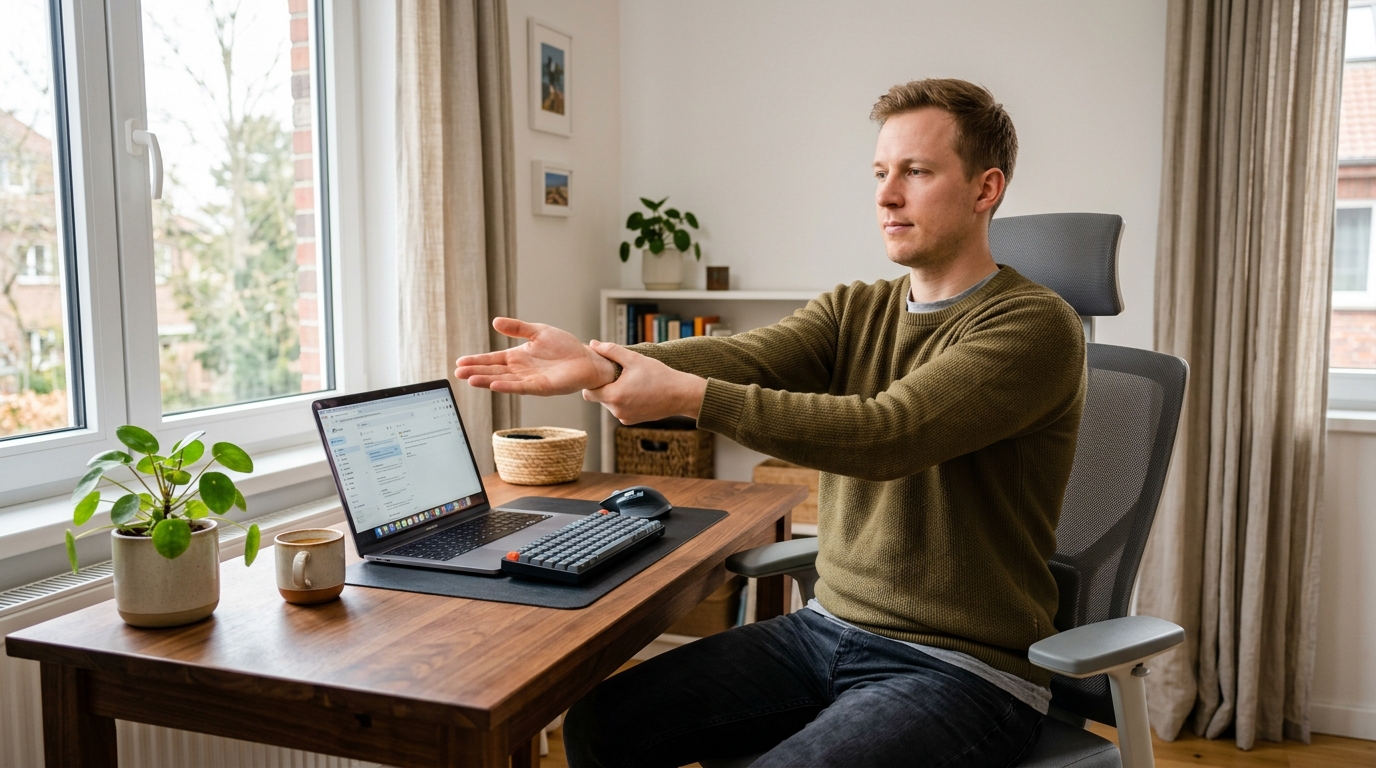
Why Your Wrists and Forearms Hurt After Typing
If you spend hours typing, coding, or clicking through spreadsheets, it’s easy to finish the day with heavy, sore wrists and tight forearms.
Working from home can make this worse when your keyboard and mouse setup isn’t ideal.
During long typing sessions, it’s not just the wrist joint that works.
The forearm flexor and extensor muscles stay under low-level tension as your fingers move quickly, and over time they can become shortened and fatigued.
This routine is for mild stiffness and fatigue, not for treating serious pain or disease.
If symptoms are severe, new, or persistent—especially if you feel numbness, tingling, or weakness—consult a healthcare professional before continuing.
Studies on computer work and ergonomics recommend regular posture changes and short stretch breaks to help reduce discomfort in the wrists, forearms, and upper body during repetitive keyboard and mouse use.
This 15-minute wrist and forearm reset is designed to fit naturally into a busy remote workday so you can ease tension without needing any equipment.
I started using this routine on days when my wrists felt heavy after back-to-back typing, and even one 15-minute block made the next few hours feel noticeably lighter.
Overview: The 15-Minute Wrist and Forearm Reset

You can do this routine seated in a chair, right at your desk.
It’s broken into four simple parts:
- 3 minutes: Forearm stretches (front and back)
- 3 minutes: Wrist and finger mobility
- 4 minutes: Hand and palm release
- 5 minutes: Shoulder, neck, and posture reset
You don’t need to do it perfectly for it to help.
Aim for gentle movements within a comfortable range, and focus on smooth breathing throughout the routine.
If you’d like a companion routine that focuses more on your overall desk posture and back, you might also like our guide 15-Minute Home Office Posture Reset: Gentle Stretches to Ease Back and Neck Tension.
Step 1: Forearm Stretches (3 Minutes)
This first step targets the muscles on both the front and back of your forearms, which often tighten during long typing sessions.
Stretch the back of the forearm
- Sit tall in your chair with your shoulders relaxed.
- Extend your right arm in front of you at about shoulder height, palm facing down.
- Gently bend your wrist so your fingers point toward the floor.
- With your left hand, lightly press on the back of your right hand until you feel a mild stretch along the top of your forearm.
- Hold for about 10–15 seconds, breathing slowly.
- Release, shake out lightly, and repeat 2 more times.
- Switch to the left arm and repeat.
Keep the stretch gentle—aim for a comfortable pulling sensation, never sharp pain.
You can slightly bend your elbow if fully straightening it feels uncomfortable.
Stretch the front of the forearm
- Extend your right arm again, this time with your palm facing up.
- Gently bend your wrist so your fingers point toward the floor or toward you.
- Use your left hand to lightly pull your fingers back toward your body until you feel a stretch along the inner side of your forearm.
- Hold for 10–15 seconds, then release and repeat 2 more times.
- Switch to your left arm and repeat.
Between each repetition, relax your arms and let them hang by your sides for a few seconds.
This small reset helps your muscles let go of tension instead of holding it continuously.
If your wrists and elbows feel particularly tight after coding or heavy typing, you might also benefit from our 15-Minute Wrist and Elbow Reset Routine After a Day of Keyboard and Mouse Work.
Step 2: Wrist and Finger Mobility (3 Minutes)
After stretching the forearm muscles, you’ll add small movements to improve circulation and mobility.
Gentle wrist rolls
- With your arms relaxed at your sides or resting on your thighs, slowly make gentle circles with both wrists.
- Roll 10 times clockwise, then 10 times counterclockwise.
- Keep the movement small and smooth, staying inside a comfortable range.
The goal here is to lubricate the joints and encourage blood flow, not to force a big range of motion.
Open and close the hands
- Make a soft fist with both hands, then slowly open your fingers as wide as you can.
- Repeat this 10–15 times at a relaxed pace.
- Avoid squeezing too hard; imagine you are gently holding a sponge, not crushing it.
These simple movements help “wake up” the muscles and tendons that control your fingers and wrists after static typing positions.
They also serve as a quick micro-break you can use throughout the day, even outside this full 15-minute routine.
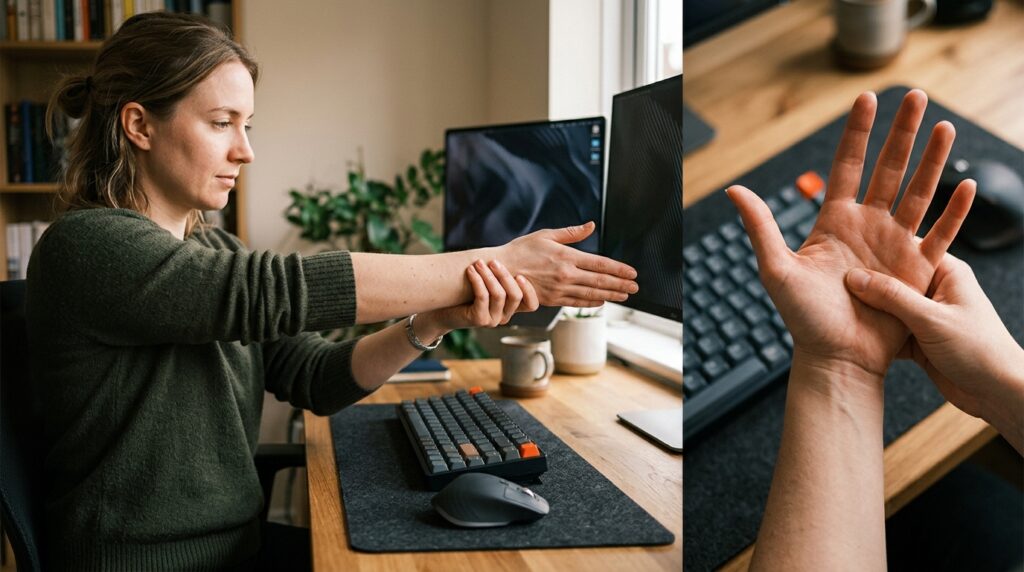
Step 3: Hand and Palm Release (4 Minutes)
Typing and mouse use demand a lot from the small muscles of your hands and the fascia in your palms.
Releasing this tension can make your wrists and forearms feel freer.
Palm massage
- Bring your right hand up and gently press your left thumb into the center of your right palm.
- Using small circular motions, slowly massage the middle of your palm for 15–20 seconds.
- Move toward the base of each finger, spending a few seconds in any spots that feel especially tight or tender.
- Switch to your left hand and repeat.
Keep your pressure moderate—you want to feel relief, not bruising.
As your palms soften, your grip often relaxes, which can reduce how hard you hold your mouse or keyboard.
Finger pulls and shakes
- Gently hold each finger near its base and give it a light, slow pull away from the hand, then release.
- Do this once or twice per finger on both hands.
- Finish by softly shaking out your hands for 10–15 seconds.
This combination can help release lingering tension after long stretches of typing or mobile use.
For days when your neck and wrists both feel tight from phone scrolling, see our routine 15-Minute Stretch Routine to Relax Your Neck and Wrists After Heavy Smartphone Use.
Step 4: Shoulder, Neck, and Posture Reset (5 Minutes)
Wrist pain rarely exists in isolation.
Stiff shoulders, a forward head posture, and a rounded upper back can all increase strain on the arms and wrists.
Shoulder rolls and chest opener
- Sit at the edge of your chair with your feet flat on the floor.
- Roll your shoulders up, back, and down in slow circles 10 times.
- Then reverse the direction and roll them 10 times forward.
Next:
- Interlace your fingers behind your back (or hold a towel if your shoulders are tight).
- Gently draw your shoulders back and down, lifting your chest and opening the front of your body.
- Hold for 15–20 seconds while breathing calmly.
This helps counteract the rounded, forward posture that often accompanies long hours at a laptop.
Neck side stretches
- Sit tall, let your right ear gently move toward your right shoulder without lifting the shoulder.
- Place your right hand lightly on the side of your head for a gentle extra stretch if it feels comfortable.
- Hold for 10–15 seconds, release, and switch sides.
As you stretch, keep your eyes looking straight ahead and your jaw relaxed.
These small neck and shoulder resets can make your wrist and forearm stretches more effective by addressing the whole chain.
If you notice that your neck and back also feel tight after work, you can combine this routine with 15-Minute Neck and Shoulder Reset After Meetings and Overtime for a more complete upper body release.
How Often Should You Do This Routine?
A practical target is to do this 15-minute wrist and forearm reset once or twice a day on heavy typing days.
Many remote workers find it helpful to schedule it after a long morning session and again near the end of the workday.
You can also break it into smaller blocks:
- 3–5 minutes of forearm stretches after intense typing.
- 1–2 minutes of hand and palm release while your code compiles or during meeting breaks.
Research on micro-breaks during computer work suggests that short, regular breaks with simple movements can reduce musculoskeletal discomfort and improve comfort ratings over time.
Think of this routine as one structured micro-break that protects your wrists and forearms as part of your daily workflow.
When to Stop and See a Professional
Gentle stretching can help with everyday tightness, but it’s not a substitute for medical evaluation or treatment.
Stop and talk to a healthcare professional—such as a doctor, physical therapist, or occupational therapist—if you notice any of the following:
- Pain that is severe, sharp, or getting worse.
- Night pain that wakes you up.
- Tingling, numbness, or “pins and needles” in your thumb, index, or middle fingers.
- Weakness in your grip or frequent dropping of objects.
In those cases, you may be dealing with conditions like tendinopathy or carpal tunnel syndrome, and you’ll need a tailored treatment plan.
You can still use parts of this routine with your provider’s guidance, but medical advice comes first.
Related Routines You Might Like
- 15-Minute Wrist and Elbow Stretch Routine for Developers and Desk Workers – A focused sequence for easing tension in the wrists and elbows after intense keyboard and mouse work.
- 15-Minute Wrist Protection Routine for Students and Desk Workers – A gentle routine to support wrist health during long study or office sessions.
- 15-Minute Home Office Posture Reset: Gentle Stretches to Ease Back and Neck Tension – A posture-focused routine that pairs well with this wrist and forearm reset for full upper-body relief.
Frequently Asked Questions
Q1. Can I do this routine at my desk, or do I need a mat?
A: You can do the entire routine seated at your desk in an office chair.
No mat or special equipment is required—just enough space to extend your arms comfortably in front of you.
If you prefer to stand for parts of it, that’s fine too.
The most important thing is that the movements feel controlled and comfortable, not forced.
Q2. How often should I do these wrist and forearm stretches?
A: For most desk workers, once a day on heavy typing days is a good starting point.
If your wrists and forearms feel especially tight, you can repeat the routine twice a day or break it into shorter 3–5 minute blocks.
As with any new routine, start gradually and pay attention to how your body responds.
If discomfort increases instead of improving, ease off and consider seeking professional advice.
Q3. Is it normal to feel some discomfort during the stretches?
A: A mild stretching sensation or gentle ache in tight muscles can be normal.
However, you should never feel sharp, burning, or electric pain, especially around the wrist or fingers.
If you do, stop that movement, reduce the range, or skip that exercise altogether.
Persistent or intense pain is a signal to consult a healthcare professional rather than pushing through.
Q4. Can I use this routine if I already have a diagnosis like carpal tunnel syndrome?
A: If you’ve been diagnosed with carpal tunnel syndrome or another wrist condition, you should follow the guidance of your healthcare provider first.
Some of these stretches may still be appropriate, but others might need to be modified or avoided depending on your situation.
Use this routine as a gentle support tool only if your provider agrees, and never as a replacement for a prescribed treatment plan.
Learn More
For more on ergonomics, computer work, and musculoskeletal health, you can explore:
- CCOHS – Office Ergonomics: Stretching at the Workstation
Practical stretches and break recommendations you can use at your desk to reduce strain in your hands, arms, shoulders, and neck during computer work.
https://www.ccohs.ca/oshanswers/ergonomics/office/stretching.html - Mayo Clinic Health System – Carpal tunnel syndrome treatment
Overview of nonsurgical options and medical treatments for carpal tunnel syndrome, including activity modification and ergonomic changes for the wrist.
https://www.mayoclinichealthsystem.org/hometown-health/speaking-of-health/can-carpal-tunnel-syndrome-be-treated-without-surgery - OSHA – eTools: Computer Workstations
U.S. Occupational Safety and Health Administration resource on proper computer workstation setup and posture to help prevent musculoskeletal discomfort.
https://www.osha.gov/etools/computer-workstations
Leave a Reply